Expiry should be enforced by the server or delivery layer when it receives each new request. Caching can reuse a response fetched earlier according to its cache rules, and a file already downloaded is outside the origin’s control. Decide the cache policy before sharing and test the actual image endpoint before and after the cutoff.
Separate link expiry from image deletion
An expiration date indicates when a service can no longer allow access to a specific link or authorization. It may not imply that the original object has been removed, all derivatives deleted, content cleared from a CDN, or files downloaded by a previous recipient deleted. These are independent life-cycle actions and will require separate confirmation.

When a share has expired, a server can refuse any further requests for the share after the date of expiration. If the user's browser has previously downloaded the image, then the browser may continue to display the image using either its memory or its cache. However, if the user downloaded the file, no HTTP header will be able to penetrate the user's device and delete the file.
When storing the date and timezone, it is important for the sender and recipient to have full understanding of both. Store either a UTC timestamp or a timezone-aware value, provide an easily readable expiration date, and test at the boundaries. Avoid using a locally formatted time string, which could be misconstrued when processed on a different server.
Three timelines, three controls
- 01Before expiryA new request is evaluated and may be allowed.
- 02Expiry instantThe authorization policy changes at the configured cutoff.
- 03Cached responseAn earlier response may be reused under its freshness rules.
- 04Downloaded copyA file already saved is outside the origin’s control.
What a signed URL usually validates
A signed URL is a delivery service address (bearer) with either a signature or token that the service uses for verification. The signature can be used to link the object key, allowed operations, expiration time, and other parameters of the request to the URL. If someone has a valid URL, they will likely be able to use it as long as the delivery service allows.
After the first user opens a signed image, a signature will not make the image automatically private. If the signed image is copied while still valid, a second user can potentially obtain the signed image within the same time frame. Ensure that your signature only applies to one specific object and one intended purpose. Do not use the same signature across multiple objects or on a single web page for an extended period of time.
A storage URL and an application's share policy cannot be exchanged for one another. When an application specifies a shorter expiration time for its content, however, if a storage URL signer creates an object URL that has a longer expiration date, the byte-serving path will continue to be available even though the page indicates that the content is no longer accessible. Compare the application's cutting-off point with the delivery credential produced by the signer and determine if the direct object route can be accessed.
Read the request timeline at the cutoff
Normally, the critical time for a server-side policy to evaluate a request is when the server processes the request. A request received prior to expiration can potentially be approved and continue to transmit even though the expiration date has passed. Whether or not the transmission of a request is interrupted after the expiration date passes is dependent upon the server and storage path. Any requests initiated after the expiration date has passed will likely be denied.
A new browser window/tab does not necessarily mean that you will have a new network request. Your browser may use memory caching, a service worker, or an intermediary response. An accurate expiry test will record if the response was actually obtained from the network, what status code it returned, and whether the representation came from a cache.
Separate tests will be done on the Share Page and the Image Bytes. If the page displays a "Expired" message, however, the Image URL continues to return Bytes; then the expiry control only affects the page. Perform similar checks on Original, Thumbnail, Resized, and Download routes when applicable to the Service.
| Time or state | Fresh origin request should do | Possible existing copy |
|---|---|---|
| Before cutoff | Apply the current permission and expiry rule | A client may cache the allowed response |
| At or after cutoff | Deny a request under the expired policy | An earlier cached copy may still be present |
| After revocation | Deny future origin requests when revocation is enforced | Previously downloaded files remain with recipients |
| After storage deletion | Return no image if the object and variants are actually removed | External backups or saved copies may have other retention |
Understand freshness, validation, and cache directives
An HTTP cache will use a previously cached response if the response is "fresh" based on the rules applied to the request. If the response is considered "stale," the cache may send a validation request to the origin server, and use a validator (e.g., ETag or Last-Modified) to determine if the response remains valid. RFC 9111 provides guidance regarding how caches should store, validate, and reuse responses; however, it does not guarantee that all applications' internal caches will operate in an identical manner. [1]
Cache-control: no-store instructs conforming caches to avoid storing the response. Cache-control: no-cache allows storage, however, it does require verification of validity prior to its subsequent use. The two directives are not synonymous; furthermore, no-store is not a way to remotely delete content that was previously stored within the cache when the header changed. MDN provides further detail on how each directive differs from one another and provides an explanation of what can typically be expected from caches. [4]
Shared caches have their own rules which are different than those for browser caches. A content delivery network (CDN) or reverse proxy can use its own caching rules. The most common references for web caching come from MDN, and they provide documentation on how shared caches process "max-age" and "s-maxage" directives under various gateway configurations. Rather than assuming that a single "generic" header is the only caching policy being used, verify what headers were received as part of the response, and how the server is configured. [3]
Compare a new request before, at, and after the expiry cutoff
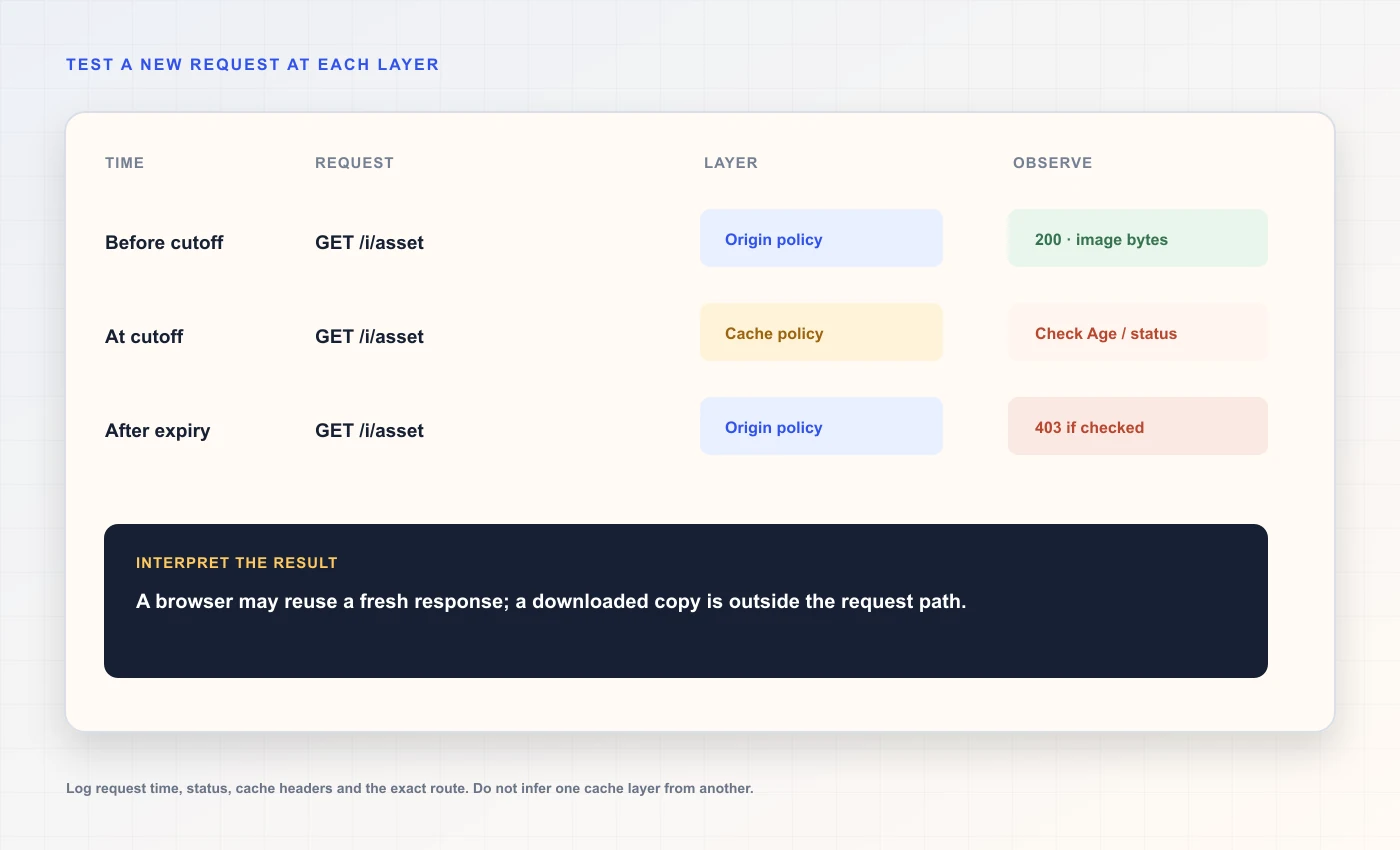 Request timeline at expiry
| Directive | Usual intent | Common misunderstanding |
|---|---|---|
| max-age=N | A response can be fresh for N seconds in a private cache | It does not necessarily describe every shared-cache rule |
| s-maxage=N | Sets freshness for shared caches when applicable | It does not authenticate the requesting recipient |
| no-cache | A stored response must be validated before reuse | It does not mean the response cannot be stored |
| no-store | A conforming cache should not store this response | It cannot erase a copy stored before the policy changed |
| private | Shared caches should not reuse the response for other users | It does not stop a recipient from saving a local file |
Use freshness lifetimes that match the content and access promise
Product imagery, such as product photos, that are publicly available and can never be changed typically last for a very long time if every time there is an update to the photo it is given a different URL. On the other hand, review images that are private and expire have very different needs than product imagery. Because the cache may continue to provide a response after a policy change at the origin, the URL design strategy and caching strategy need to be coordinated with one another.
The maximum age that can be set for a file is different from the guarantee of when it will be removed. For example, a user's web browser can maintain a copy of files in memory, a page may contain an image after being navigated to, or an application could have its own caching system. The way a shared caching system handles the maximum age depends on how the directive was configured and how the provider has set up the caching system.
When the URL is versioned and the image is public, it's usually better to create a new stable cache instead of overwriting existing bytes at the same address. When possible, you should either authorize through the server or use a delivery mechanism that has had its cache semantics verified with respect to the promise of revoking access. Do not provide a long cache life-time to a response that you plan on making private in the future.
Know what revocation can stop
A revocation may cause an updated policy check to deny access to bytes for any subsequent request. However, a revocation does not cause files previously downloaded to disappear, screenshots on the recipient’s device to be deleted, nor will it remove files from systems that have previously imported them.
A cache purge may remove certain provider-held responses if the provider allows for that; however, a cache purge will have both a specific scope and an associated completion state. The cache purge will not be able to clear any private browser caches or files that were previously copied to another location. When a service makes promises about rapid revocation, inquire as to which delivery channels they manage and verify each of them.
Don't create a design that allows for an image to be downloaded once via its private URL and only have the landing page expire. An individual could potentially save the direct link to the image. Protect the image data directly or find a way to share the image publicly using a lifecycle that aligns with the asset.
Revocation boundary
- 01OriginCan evaluate policy and deny future requests.
- 02CDN or proxyMay have an earlier response under its cache rules.
- 03Recipient browserMay retain an image in memory or local cache.
- 04Saved fileCannot be removed by changing the original link.
Run a small reproducible expiry check
A synthetic image should be used in a local or staging environment rather than a customer's image. The expiration date of the image should be set to a short period after the current time, and the exact UTC value of this expiration date must be recorded. After fetching the page and bytes prior to the expiration date, immediately make another GET request for the page after the expiration date. Separate the headers from the rest of the response to prevent a bearer token from being included in the test report.
Repeat the steps above using both a private browsing session and directly accessing the URL via an HTTP client. When there is a CDN in the path, verify what the CDN cache status is for each request. Then, run tests using the actual public URL for your application. When you perform the tests, do not issue multiple requests at the same time which will overlap in terms of execution time. All of those requests should expire at the exact same millisecond.
Compare the results against what you had planned. A "passed" test only proves that the tested path was correct in the current environment. This does not guarantee that other areas, such as a browser cache, backup, or receiving device do not contain a previous version of the document.
Interpret Age, validators, and cache status carefully
The Age response header is used to determine how long a response was held in a shared cache, but the fact that it isn't present doesn't necessarily mean that there wasn't a cache. For example, a CDN could provide an additional status header specific to its provider; a browser's memory cache would be visible within the browser developer tools instead of within the response headers. [3]
ETag and Last-Modified provide support for conditional validation. A 304 response indicates to a client that they can utilize their previously retrieved representation if the validator is the same, but will not receive the complete image body. When a new request results in a 304 response following a policy change, then that request needs to be evaluated closely as the cache might be using a previously retrieved representation.
The entire request method, the final URL, the status chain, the cache headers, the response type, and the elapsed time must all be documented. It should be noted that there are instances where HEAD will have different behavior than GET. If you are unsure whether a HEAD request has returned the correct response, then perform a GET to confirm. RFC 9110 specifies status semantics, whereas the cache standards specify how stored responses can be utilized. [2]
Plan for browser and application caches
A user's browser may retain an image in its RAM (Random Access Memory) until the user navigates away from the website. A service worker or application-specific cache may create another copy of the same image. In some cases, back/forward navigation can show the last known state of a web page rather than sending a new request to the server as the user expects. These two types of behavior operate independently of the HTTP cache and cannot be relied upon to refresh with the single click of the "Refresh" button. [3]
When troubleshooting issues with your app, consider using the "Network" tab in your browser's "Developer Tools" to turn off caching during the time you're troubleshooting. This will allow you to see what is being requested from the server and what is being served from local storage. Please keep in mind that turning off caching in your browser only affects the current session, not the CDN or other users' browsers. You can create a new test URL or use a controlled method of clearing cache (such as deleting all files) to find the service path.
The use of multiple layers of storage to save responses is acceptable for applications that are designed with the intention of being sensitive to users' privacy, but only when there is a valid reason to do so and there is an established plan for deleting the saved data. An example of a potential source of long-term storage of user information is a content delivery optimization (CDO) system. In order to understand where user data may be stored in transit from the original source of the content to the reader of the content, it is necessary to identify each layer of caching along that route. Each of those layers should then be identified as to who controls the content stored within them. [1]
Choose an expiry model by how the image is delivered
An user facing share page will verify the validity of the link on each view of the page, and will use the same method of authorization to fetch the image. A signed object URL may lighten some of the load from the application, however, it must support a similar expiration/revocation strategy. A public immutable asset offers a different promise: it is expected to continue to be available to download/access and cacheable. [4]
Avoid using the wrong model by mistake. When a shareable page's expiration time is reached, but it has previously provided a direct URL that is publicly accessible, then the image could still be accessible via that direct URL. In addition, when a signed URL remains valid longer than the expiration date on the page, the delivery token is the larger amount of time available for accessing the content. Be sure to use consistent end-of-use dates for both.
When a client receives a screenshot through a mobile device or a delayed email, it will take them some time to see the screenshot. Therefore, you should set a cutoff time for your link that allows the client to view the screenshot in their daily routine, provide the client with the time zone for the cutoff, and allow the client to ask for a renewal of the link if needed. Do not put the cutoff in a small footnote. client review link workflow
| Delivery model | Expiry check | Cache design question |
|---|---|---|
| Private origin proxy | Application can check current policy per request | Will all intermediary responses be no-store or revalidated? |
| Signed object URL | Storage validates signature and expiry | Does token expiry match the application policy? |
| Public permanent URL | No private expiry unless the object is removed | How long can browsers and CDNs reuse the bytes? |
| Email image URL | Mail client may fetch later or proxy it | Will it still work throughout the email’s review window? |
Make expiration understandable to the recipient
Include a clear date, time, and timezone next to the link or on the page where the link was shared. The phrase "available for two days" can be confusing if the person who receives the message opens it late, or lives in a different time zone. Provide instructions for requesting a new link without revealing the original token in a public support channel.
A good expired page tells the user that the link they used is no longer valid, and gives them an option of what to do next, safely. The expired page should never disclose whether or not a user’s guess at a private asset ID is a valid one, nor should it contain private meta data within the error response. Make sure the message displayed remains consistent across missing, revoked, and unauthorized assets if disclosing existence could cause harm.
If an image seems to be present after it should have expired, then make sure to separate a new request for the image from a copy of the image that was displayed locally. You should ask the user to verify by creating a new browser session, assuming this is safe to do so. However, you should not suggest that verifying the image using a private browsing mode will remove a previously saved copy of the image.
Test the exact routes and cache layers
Use a simulated image and select a specific UTC cut off. After the cut off, obtain the image sharing web page and direct image from a signed-out state. After obtaining the image sharing web page and direct image from a signed-out state, do so again with a signed-in state. Document the response code (status), content (body) and time stamp in order to reproduce your results.
Check the response headers as well as the cache indicators on the delivery edge as well as at the origin. A browser displaying an image does not indicate if the image was retrieved directly from the origin or from a cache, therefore you will need to make another fresh request to see which route was taken to serve each of the two responses.
The success of a check is limited to only those routes, times and cache layers that have been checked. To ensure proper testing, delete all test objects and any derivative cleanups as separate checks. Expiry may prevent future requests, however, it cannot retrieve a downloaded image nor can it confirm that every cache layer has deleted its copy.
A decision checklist before you send an expiring image
Decide what to do when a "cut off" occurs (stop taking in new requests, delete the object, or both). Select either an origin validation path or a signed delivery path which will enforce your decision. Every derivative should follow this same rule. Note if a transfer in flight can continue to completion.
The cache policy must be configured prior to the first public fetch of the image, and the response can be tested in the actual delivery environment. A newly introduced "no-store" header will not reverse a previous fetch that was performed under a public policy. When the image is updated, a versioned address should be used. Private images should not use the same public URL.
Tell recipients the precise expiration date of the link and what limitations there are on revoking it. A link may be disabled to prevent future use of the link; however, the data that has been downloaded via the link cannot be retrieved. To understand the security models associated with each type of link, see the Password vs. Unlisted Link Comparison. When creating a Markdown embedded link, use only a direct image URL once you have followed the HTTP Response Troubleshooting Steps.
- The expiry is stored as an unambiguous instant and enforced on the byte route.
- Signed credentials and application policy share a compatible cutoff.
- Cache behavior is deliberate and tested before the first share.
- The recipient understands that saved copies cannot be remotely recalled.
Frequently asked questions
Does a link expiry delete the image?
Not necessarily. Expiry may only block new requests through that link. Object deletion, derivative cleanup, cache invalidation, and removal from backups are separate operations that need their own lifecycle controls.
Can a cached image still appear after the link expires?
Potentially. A browser or intermediary may reuse a previously stored response under its cache rules, or the image may remain in the page’s memory. Test a genuinely new request and inspect the response source; the origin cannot remove a file already downloaded.
What is the difference between no-cache and no-store?
No-cache permits a cache to store a response but requires validation before reuse. No-store tells conforming caches not to store the response. Neither directive recalls data stored before the policy changed or prevents a person from saving a copy.
Does a signed URL stop working exactly at expiry?
The storage service checks the credential according to its clock and implementation, but details such as clock skew and in-flight requests matter. Use an explicit UTC cutoff and test the actual object URL before and after it in the target delivery environment.
Can I revoke an image after I emailed it?
You can block future origin requests if all delivery paths check the updated policy. You cannot retract a downloaded attachment, screenshot, or cached response that is already outside the service. Email clients can also fetch remote images through proxies.
Should expiring images use a CDN?
A CDN can be used if its cache behavior and authorization model match the access promise. Configure and test the exact origin and edge rules. A cache rule that serves earlier bytes after the application cutoff can defeat page-level expiry.
Sources and further reading
References are linked beside the relevant claims. Source pages were checked on the dates shown; product documentation and standards may change.
- [1]RFC 9111 — HTTP Caching ↗
IETF · Published 2022-06 · Checked
- [2]RFC 9110 — HTTP Semantics ↗
IETF · Published 2022-06 · Checked
- [3]HTTP caching ↗
MDN Web Docs · Checked
- [4]Cache-Control header ↗
MDN Web Docs · Checked