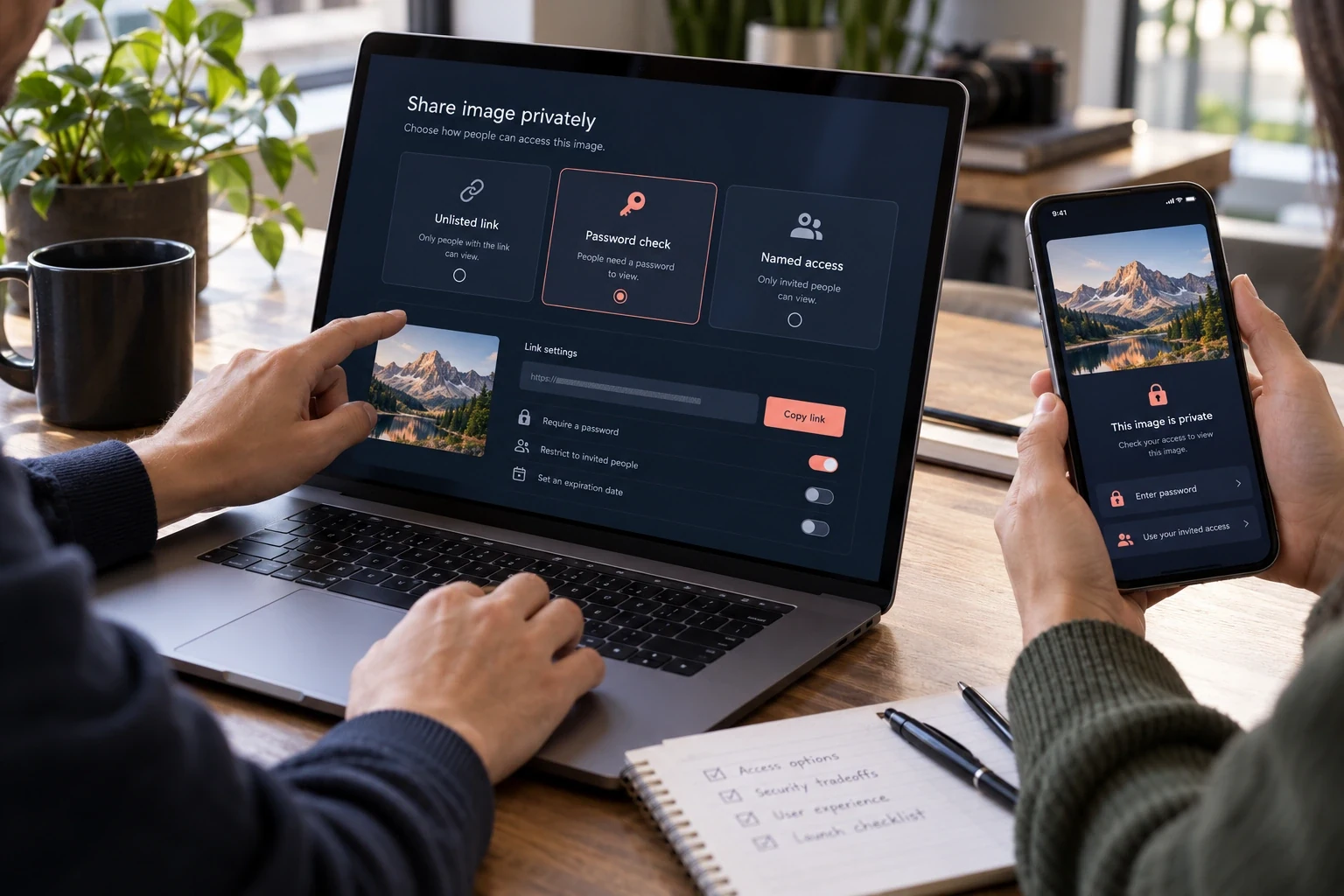
An unlisted link is usually a bearer secret: possession of the URL is enough. A password adds a separate check only if the server verifies it for every path that can return the image bytes. Named-user access can identify recipients, but it still cannot stop an authorized person from saving or photographing what they can view.
Start with the asset and the people who may reach it
A screenshot can be used to capture conversations that are private, customer data records, campaigns being developed, and products that have not yet been released. Which sharing method is used will depend on what would happen if the URL was shared with others, guessed by someone else, pasted into a public ticket system, or copied out of the browser. “Hidden” refers to how easy it is to find the URL; it does not refer to whether or not you are authorized to access the URL.
Three common models exist for providing access to content. They include: an unlisted bearer link; a single shared password; and individual user-based authentication. An additional type of model (signed URL) allows for the addition of time/scope constraints to a bearer credential. Each of these models presents trade-offs regarding ease-of-use, verification of who has accessed content, ability to revoke access, and operational complexity.
This document provides a comparison of these models as engineering controls. This does not provide an endorsement for a particular service provider, nor does it constitute legal counsel. The inclusion of a password and/or expiration date in a control is only effective if all of the following are protected by the same access decision: the share page, original image, thumbnail(s), transformed copy(s), and download route(s). Each of these should be verified prior to using the control.
Access is a decision on every request
- 01Identify resourceResolve the exact asset and the requested original or variant.
- 02Evaluate policyCheck owner, link state, password grant, expiry, and revocation.
- 03Return or denyOnly then read bytes from private storage and set cache rules.
- 04Record safelyKeep operational evidence without logging secrets or image contents.
An unlisted link is a bearer credential
An unlisted URL may not be indexed in a public directory or accessible via search engines, however the URL itself generally allows for access to the content. The unlisted URL can be forwarded to others, pasted into another user's account, or posted publicly on a ticket. Randomly generated tokens provide less opportunity for users to guess the URL, but they do not provide proof that a user viewed the image.
The token must be produced by a cryptographically strong random number generator and have adequate randomness for the threat model. Do not utilize sequential identifiers, file names, date/time stamps, or cryptographic hashes of publicly available information. Avoid utilizing identifiers that can allow an attacker to identify other systems or resources.
Treat a bearer link as if it were a password even though there isn’t a password input box on it. Do not allow your bearer links to appear in analytics, public issue reports, application logs, referrer headers (when possible) and screenshots. A bearer link used in a group chat could potentially be retrieved by anyone who can view the group chat.
A password gate adds a condition, not recipient identity
The link alone will now no longer be enough to access the site; the recipient will need to provide the correct password. Password gates are helpful for protecting against unauthorized viewing of content, especially after the link has been shared with others (e.g., via email forwarding). However, password gates do not help determine who provided the correct password if multiple people use the same password.
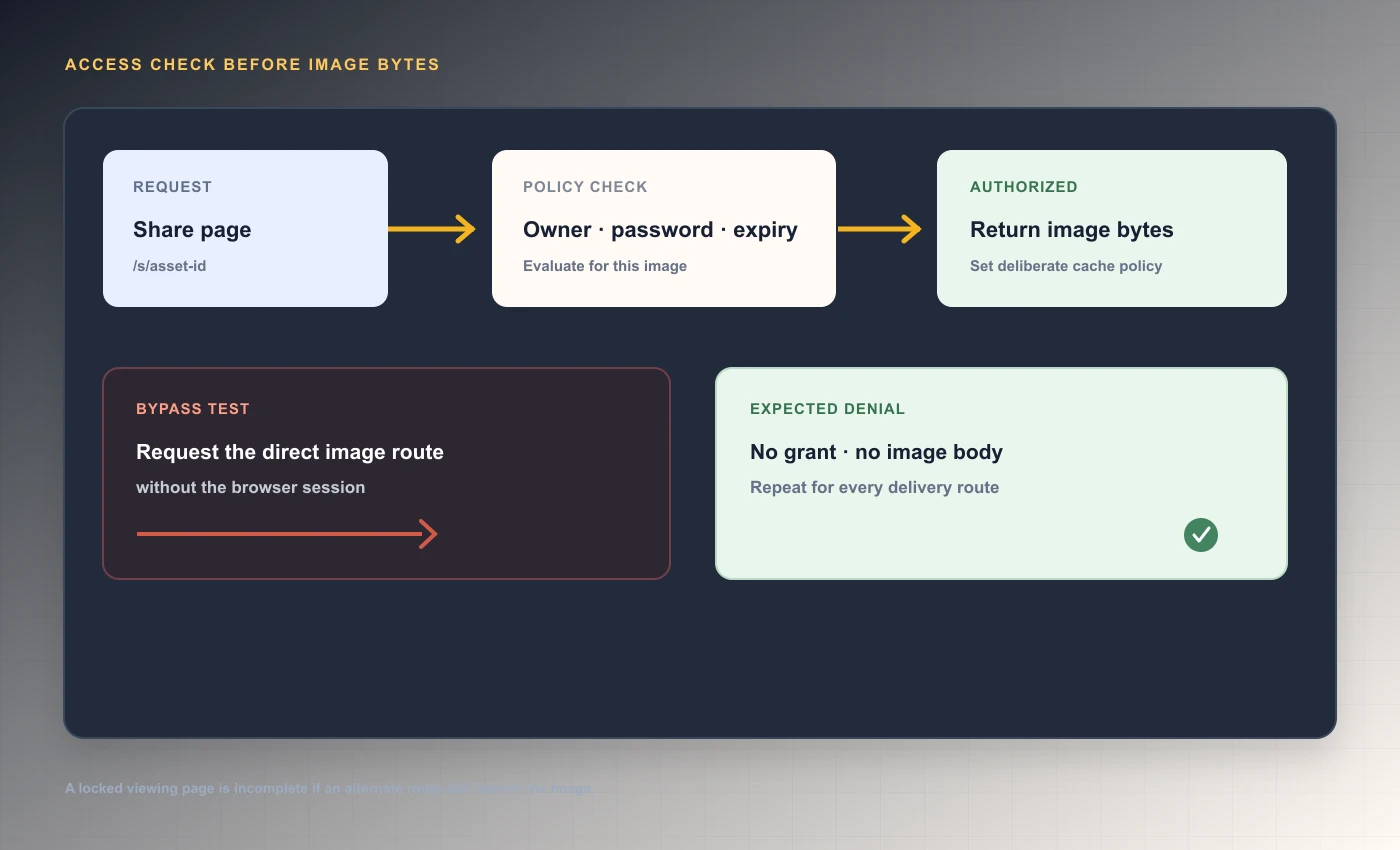
Passwords only protect an image when the server validates the password prior to providing any type of representation. Creating a "gate" for the visible share page but allowing access to the original image, thumbnail, preview, transformed file, or download path creates a bypass. The Open Web Application Security Project (OWASP) recommends that you check for authorization with every request and for every requested object or function. [1]
Check the access gate before returning image bytes
 Gate the image response
The policy regarding delivering pages and images needs to be based on a single central decision. It is important to avoid placing a common password within the URL, as part of the page's source code, or by copying it into the image's endpoint. When a user has been verified, they should receive an authorization grant that is scoped and has a short duration. Later requests will require checking the resource's state and whether the grant remains valid. [1]
| Model | What the recipient proves | Good fit | Main limitation |
|---|---|---|---|
| Public URL | Nothing beyond knowing the address | Public illustrations or assets | Anyone who finds or receives it can request it |
| Unlisted bearer link | Possession of a hard-to-guess URL | Low-sensitivity convenience sharing | Forwarding exposes access; no recipient identity |
| Shared password | Link plus a shared secret | Small group or short review window | Secret can be reused or forwarded; identity is unclear |
| Signed URL | Possession of a scoped, time-limited signature | Automated delivery with bounded lifetime | Bearer credential can be used until expiry or revocation |
| Named-user access | A provider-recognized account and permission | Confidential work with accountable recipients | More setup; viewing still permits capture or copying |
Store password verifiers safely and limit guesses
The use of a plain text share password is never recommended. The OWASP organization suggests using a strong password-hashing algorithm, like Argon2id, bcrypt, or PBKDF2, which are designed to be slow in order to make brute force attacks more difficult. Each password-hashing algorithm requires a unique salt value. OWASP recommends using Argon2id for all new systems when possible. A system's work factor should be adjusted based upon the actual environment in which the system operates, rather than copying a work factor from another system without first testing the work factor on the specific operating system. [2]
A long password has less of a chance to be cracked in a brute force attack (guessing) on the Internet as long as there is no limit to the number of times you can guess. Limit the number of times an attacker can attempt to guess your password using both link and network signals. Use a back-off method or temporary denial when limits are reached. Monitor any potential abuse without collecting more personal information than what is needed. Do not allow attackers to exhaust a counter in order to cause the legitimate user to lose access to their account. [3]
A password grant needs to be restricted to that particular image, and must expire. If the user changes their password, revokes the share, or moves the image to the trash bin, then all current grants must become invalid. Also, a recipient of an image cannot obtain access to a different image, simply due to the fact that there were two separate shares using the same password.
Password verification without a public bypass
- 01Enter secretSubmit over HTTPS to a rate-limited verification endpoint.
- 02Verify hashCompare using a password hash; never store or log plaintext.
- 03Issue scoped grantLimit it to this asset and a defined lifetime.
- 04Re-check and deliverDeny expired, revoked, trashed, or unauthorized requests.
Named access is stronger when recipient identity matters
If you want to know who has access to your collaborative project, invite the individuals using their name and give them the lowest possible role. If you do this, a service can remove one individual's access to the collaborative project without having to change a password that all of the participants share. For example, Google Drive documentation shows that it limits sharing with specific accounts and provides three different roles (Viewer, Commenter, and Editor) to participants. In addition, Google Drive's folder permissions can limit access to files within the folder. [4]
Named Access will require an Identity System to authenticate the user and provide secure permission management. Security boundaries will then include Email Verification, Account Recovery, Session Expiry, Administrative Access and Account Deletion. Simply asking for an email on a sharing page does not prove your identity.
A user who has access to view content on their computer screen can still take a picture of what they are viewing with a digital camera or phone. While some applications use download prevention tools that will help prevent the user from downloading content from the application to their hard drive, these tools do not provide complete security against people taking pictures of their screens. To better understand how much protection is needed, consider how likely the user is to attempt to copy content from the application and select the appropriate level of security based on that likelihood.
Use signed URLs with a clear scope and expiry
A typical signed URL will either contain or refer to a cryptographic signature which an origin is able to verify, as well as have an expiration date or some type of permission scope. These are beneficial when delivering images in a machine-readable format, since there is no requirement for an interactive login process. While the URL is still valid, it will continue to function as a bearer credential.
Assign scopes to the smallest object and activity required, and apply a limited validity period that is relevant to the workflow. Do not assume that a signed storage URL enforces an additional application-level password policy unless the entity who created the signature verifies the application-level password policy prior to issuing the URL. A direct permanent object address next to a temporary page token will negate the page's limitation.
The process of rotating and revoking depends upon whether there is a server-side plan. Depending on the storage provider and the way you design your keys, a signature can be valid up to the time it was signed, even if a user changes their share policy. If a policy change needs to happen immediately, then either deliver content via an authorized path or find a method to revoke the underlying token.
| Control | Answers | Does not answer by itself |
|---|---|---|
| Unlisted token | Does the requester possess this URL? | Which person is requesting it? |
| Password | Does the requester know this shared secret? | Which member of the group entered it? |
| Named user | Is this authenticated account on the allowlist? | Can the viewer keep a copy after access? |
| Expiry | Is this request before the configured cutoff? | Has someone cached or downloaded the image? |
| Rate limit | Is this request pattern exceeding a threshold? | Is the request otherwise authorized? |
Protect the original, thumbnails, previews, and editor outputs
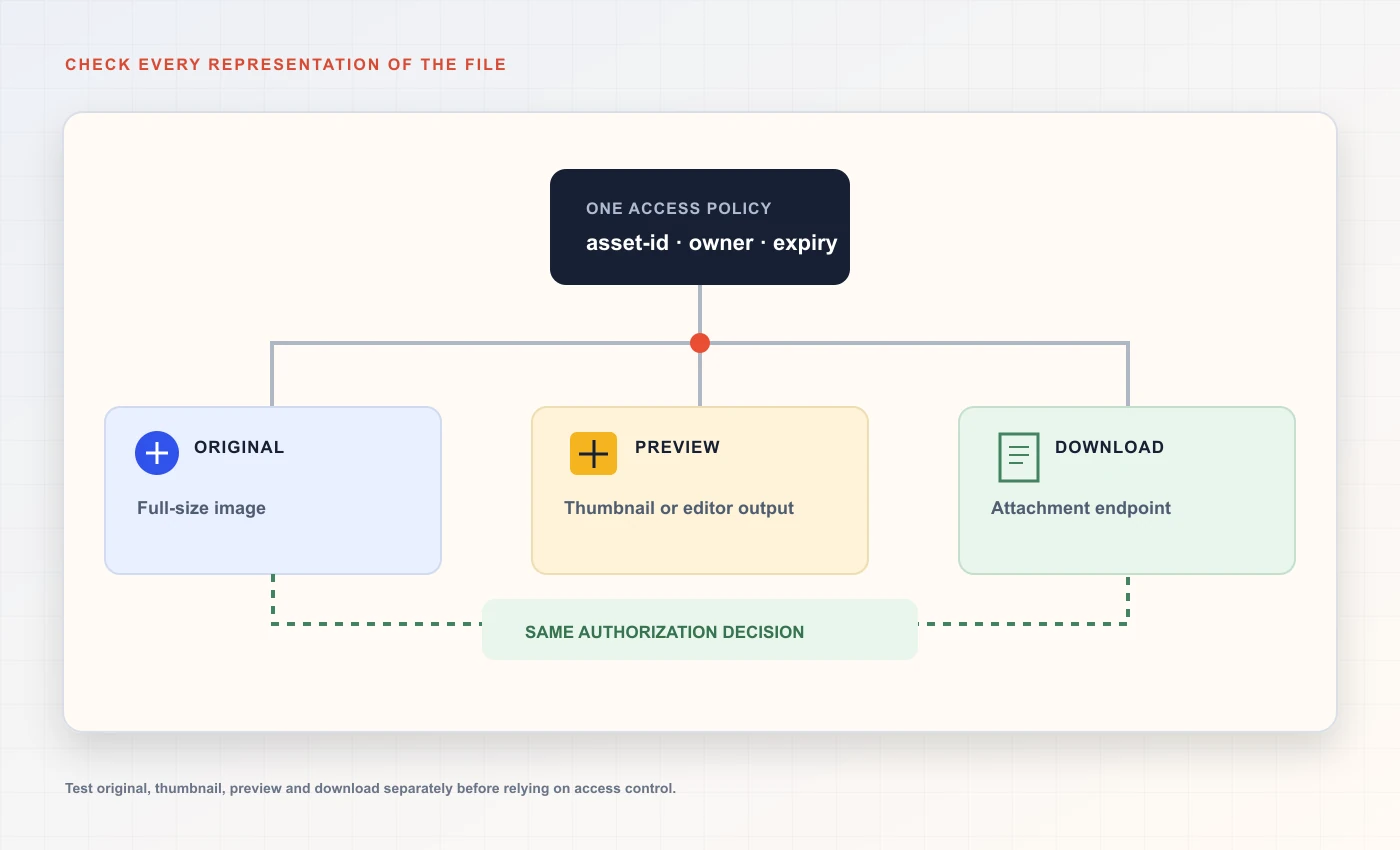
Image services frequently provide multiple paths to the same data (original, thumbnail, format conversion, sharing page, download, editing). A security assessment must list each path. A hidden thumbnail folder or an older transformed URL may allow access to the original policy's restricted content.
Every representation should use the same authorization decision
 Original, preview, and download routes
OWASP’s authorization guidelines recommend verifying permission for each individual request as well as each specific resource. Utilize this same process prior to accessing data within object storage or creating a new version of the data. Do not make the assumption that if the page itself was protected, then so too were the bytes representing the image. [1]
With private object storage you allow an authorized server or edge function to access the bytes after the policy has passed. You should test a direct GET request without a browser session; then you will be able to test the original request, each of your thumbnail requests, all transformations, and your download endpoint. Having a storage bucket that is private by default does help; however you still need to verify your application route checks as well as your bucket policy.
- List the page, original, thumbnail, transform, and download routes.
- Request each one from a fresh unauthenticated session.
- Confirm every denial occurs before private bytes are returned.
- Repeat after expiry, revocation, trash, and policy change.
Set caching rules before relying on revocation
In order to prevent unauthorized access to a revoked certificate, a correct origin verification will deny any subsequent requests; however, it is possible for a previously cached response to still be served to a user via either their local browser cache or an intermediary cache. RFC 9111 specifies the behavior of HTTP caching semantics, while MDN Web Docs provides guidance on how to properly implement 'no-store', 'private' and other related caching directives. It should also be noted that custom proxy rules and/or shared caches can influence how the situation described above unfolds. [5] [6]
When you provide your customers with an "access window" for sensitive materials, you must make sure that they understand that although you may use private, non-storage responses to deliver the material; those responses will not be able to retrieve any material that the customer may have downloaded prior to the change in policy. You also need to explain that the private, non-storage response will not remove data from a customer's computer memory, a video capture device (such as a screen recorder), or a compromised client.
Avoid making your byte data public with a long cache lifetime, and then relying on a password-protected page to provide security for the data at a later date. If your provider provides you with cache purge capabilities, consider these capabilities to be a form of operational support, which can be documented as to their scope and when they have completed. Do not view cache purge capabilities as an alternative to performing authorization checks at the origin.
Apply a threat model to the sharing workflow
Name the asset, who will view it, and how it may leave the intended boundary. If a developer preview is shared with customers and a customer exports their data, the impact of both events is different when the recipient shares either. Your control decision should be based on the potential harm caused by a breach of confidentiality and the ability of your organization to implement the control.
In addition to exposing the team's underlying assumptions about how a system will perform, threat modeling allows the team to understand what they are actually relying on to protect their system. For example, if a team believes that a browser cache will delete an image when a user closes their browser and therefore prevents anyone from accessing that image, then they have made a false assumption. On the other hand, if a team is hoping that users do not take screenshots of the system and use those screenshots to compromise the system, then this is a policy objective and not a technical mechanism.
Write the remaining risk in simple terms. The objective is to develop a control strategy that is reasonable for the organization to implement, verify and maintain, rather than just having a label that states "secure," but does not describe the route(s), cache(s), identity provider(s), or life cycle of each component.
| Threat | Useful control | Residual risk |
|---|---|---|
| URL forwarded to an unintended person | Named access or separate password with limited lifetime | Authorized recipients may still share content |
| Automated guessing | Strong random token, rate limits, monitoring | Distributed requests may evade simple IP limits |
| Public image endpoint bypasses page gate | Private storage and checks on every route | Missed legacy or derivative route can expose bytes |
| Policy revoked while CDN has a copy | No-store or bounded cache and tested purge path | Already downloaded or cached copies may remain |
| Secret appears in support logs | Redaction, safer support identifiers, limited retention | Users may paste live URLs into unapproved systems |
Test password protection as a set of requests
Create a temporary image and test account within a segregated environment. Attempt to access the share page, original, thumbnail and download endpoint prior to inputting your password; each protected route should restrict access without revealing any of the image data. Once you have entered the correct password, ensure that only the requested asset is made accessible.
After you have changed your password, removed the share, expired the share in the past, and deleted the image from your account, verify that all of the previous grants are no longer valid and that there is no other way for someone to find the image using another possible path. Capture status and header information; do not capture the actual image content or any of the secrets associated with the image.
The results of your testing should be treated as specific to the environment that you were testing in. You need to run the exact same tests on the deployed service, on each of the individual image routes, and on the cache layer, prior to being able to rely on the security controls for protecting sensitive content. A positive test result from the share page test will not guarantee that individual requests for images will be protected.
- 01
Create a disposable share
Use a synthetic image and record its page, original, and derivative routes.
- 02
Test without authorization
Request every route from a clean browser and a direct HTTP client.
- 03
Test the allowed state
Verify the correct secret grants only this asset and only for the intended period.
- 04
Change policy and retest
Revoke, expire, or change the secret, then confirm all old grants fail.
Choose a model that matches the consequence
A non-listed link may be suitable for sharing low-sensitivity content if the convenience of being able to forward the link outweighs any potential risk associated with unauthorized access. Password protection adds another layer of security (a "speed bump") to protect the link from unauthorized access, especially when the number of people who will receive the link is relatively small. Named user access is a better option than either of these methods of protecting links because it provides greater control over who has access to the linked content and allows organizations to revoke individual access rights as well as create an audit trail.
For regulated or high impact content use a validated system that has the appropriate identity verification, logging, retention, encryption, and contract requirements. Don't assume "password-protected" means compliant or that a storage provider's signature provides all of the controls your organization requires.
Select how to provide access to your product screenshots and review images prior to providing them. Read about the client screenshot review workflow when multiple versions will require approval from those who receive them. Before creating an expectation regarding the expiration of a picture, take into account the cache and expiry limits of pictures. client screenshot review workflow cache and expiry limits bug report screenshot workflow
Operational checks before relying on protected links
The first test verifies if the user can modify a policy, can view content both prior to unlocking it and post-unlock, has established a maximum number of incorrect password attempts, can revoke access to content, and can set an expiration date for access to content. Each of these tests should also be run against the viewer page, as well as each route that delivers image data. The results from these tests provide insight into which parts of the application have been used, rather than being considered as a separate security evaluation.
Before using a service to process confidential data, make sure that it has documented the following: how to identify users who lose access, how to prevent abuse by users, what type of records it creates for auditing purposes, what types of monitoring activities are conducted, how to back up and restore data, how long to retain data, and how data is delivered externally. Although access control is an important part of a confidentiality program, it does not provide all the necessary elements of such a program.
Use synthetic images to begin initial testing. After confirming with those responsible for controlling the service's route check, caching behavior, rate limits, and support procedures before using customer data, use customer data.
- Describe the actual access model and its limits before sharing.
- Test every route that can return image bytes.
- Keep passwords and bearer URLs out of logs, trackers, and analytics.
- Do not rely on a password prompt alone; verify that the access rule protects every image-serving route and explain its limits to recipients.
Frequently asked questions
Is an unlisted image URL private?
Not in the sense of recipient-specific access. It may be hard to guess and absent from public navigation, but anyone who obtains a bearer URL can often use or forward it. Use named-user authorization when identity matters.
Does adding a password protect the original image?
Only if the server checks the password-derived authorization before returning the original bytes and every thumbnail, transform, and download route. Protecting only the share page leaves a bypass if another endpoint exposes the same file.
Is a signed URL the same as a password-protected link?
No. A signed URL usually acts as a scoped bearer credential whose signature and expiry are validated by the storage or delivery service. A password asks for a shared secret. Neither proves recipient identity by itself.
Can I revoke a password-protected link immediately?
You can make new origin requests fail after the policy changes if the delivery path checks revocation. Cached copies and downloaded images may remain available. Test the page and every byte-serving route, and understand any CDN cache behavior.
Can named-user access prevent screenshots?
No. It can control who is authorized to view and support individual revocation, but an authorized person may still capture or photograph the displayed image. Do not promise technical controls can eliminate that possibility.
What should I verify before using a password-protected image link?
Confirm that every path to the image checks the password, that failed attempts are limited, and that expiry or revocation blocks new requests. A successful test does not prevent a recipient from saving or photographing an image they can view.
Sources and further reading
References are linked beside the relevant claims. Source pages were checked on the dates shown; product documentation and standards may change.
- [2]Password Storage Cheat Sheet ↗
OWASP Foundation · Checked
- [3]Forgot Password Cheat Sheet ↗
OWASP Foundation · Checked
- [4]Share and manage access to files and folders in Google Drive ↗
Google Drive Help · Checked
- [5]RFC 9111 — HTTP Caching ↗
IETF · Published 2022-06 · Checked
- [6]HTTP Caching ↗
MDN Web Docs · Checked